Ignore Lists options greyed out
I have the following issue: I want to edit the ignore list, but the options as described in the documentation are all greyed out or unfindable.
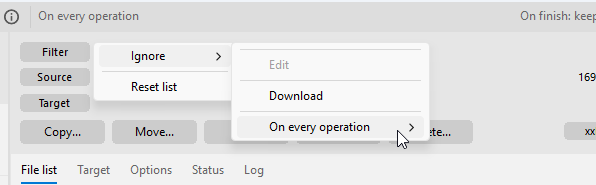
Is there a possibility to add an ignore list otherwise, e.g., directly in the config folder?Thanks for your help!
Log in to comment and vote
Comments2
Code Sector
Apr 21
Click the Filter button and select Ignore > Download.
TeraCopy will open this folder in Explorer:
\Users\%USER%\AppData\Roaming\TeraCopy\Ignore
Enter the name of the OS or application you work with (Windows, Microsoft Office, etc) on the Toptal website.
Save the webpage as a .txt file to the Ignore folder.
itbib
Apr 21
Thanks for the quick reply and explanation! In my case the folder did not open in the explorer, and there was no folder named “Ignore” but after creating it manually, it worked.