Support for copying to/from MTP media devices
It would be great if it was possible to use TeraCopy when moving files to, and from, media devices via the MTP protocol. Currently, drag&dropping or copy/pasting files to a media device (like a smartphone) will result in this outdated Windows Explorer copy dialog from Windows Vista:
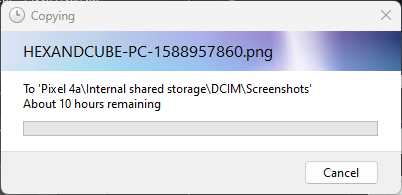
It also doesn't seem to be possible to select a media device as a target manually in TeraCopy.
Modern smartphones usually only allow for USB file transfer via the MTP/PTP protocol, and (as far as I'm aware) it's not possible to mount them as a mass storage device, without rooting/jailbreaking and exposing the file system.
Log in to comment and vote
Comments5
Code Sector
Oct 30, 2024
How to use TeraCopy with Link to Windows app:
https://blog.codesector.com/2024/10/30/how-to-copy-files-from-android-to-pc-via-wi-fi-using-teracopy/
igap-danesh
Oct 30, 2024
Sorry, you are not allowed to preview drafts.
Code Sector
Oct 30, 2024
I have updated the link.
Code Sector
Mar 14, 2024
To access devices in MTP mode as a drive letter, tools such as MTPDrive or AdbFileManager can be employed. The latter is available at no cost. While we may consider adding this feature in the future, it is currently assigned a low priority due to the availability of these two applications that address the issue.
Wayne morellini
Apr 25, 2024
Hi, Have tried android drive, pure nightmare. It can take minutes to respond to a click. Is way over sized (?). Takes hours to build a file list. Tried playing around to get that going at more than 1 file every minute or two. It dipped down transfer speed at somewhere under 200kilobits per second. So, got 1/20th of the job done in around 5-6 hours, saying it would take another 5 days. Tried to repair two folders with space on the end of name errors (and two file names (gave up), took maybe an hour to click through and try to change things, as any changing directory, properties, context menus rename or clicking on file makes it hang for long periods of time (maybe a minute or more) leading to unexpected states as clicking has functions based on timing, but in a slowed down state it's hard to judge. Produce error 31 or 32 on some files with unusual characters in name, such as Facebook page pdf saves that put the title in the file name. Starting to uninstall android drive. Mtpdrive only allows 30 files a day in the trial version, which means you can't verify it works speedily before you buy a key. So, please help us, there is no proper free mtp support to use teracopy or other backup solutions. Also, Android drive only has light support for folders, they do not come up as emulated drives that come up on sidebar or in all programs (Acronis WD didn't even see them). What we do need, is a portable solution that works on windows just be plugging in the phone, appearing as an emulated drive to all software with all relevant android blocked system files appearing as blocked, or non existent (user option to keep backups going). Select drive, rapid build out of list and rapid save all, then auto verify each file is correct with user option for bit to bit comparison without user having to press anything else (I've got to look up test verify and what happens with hash management in future as I'm trying to save time). Google probably has funding grants to do so. As it is, teracopy or Android drive, doesn't understand characters and character string ends properly, but that maybe an easy fix. However, windows mpt function also doesn't seem to understand these either giving these mysterious errors using their copy as well. So there is some misunderstanding on android or windows side in handling android file and folder names, where, fur instance even trying to change the folder name to get rid of the accidental end space brings up the dialogue the folder already exists, and trying to change to another name brings up that it cannot find the folder. Thanks, great program. However also how do I retry errored files after I fix them, and a way to adjust the file list post error with edit file/folder/path names in in original and in list, through the list function, would keep the list in sync with name changes to over come errors. The ability to also move all errors to a seperate list, where one can use truncated names for path too long errors (common with android data subdirectory paths). Then each time, the user can run those problem areas through a seperate list. Sone times it may not be important to preserve all path names, but the data itself is important. For me, I have little use, except my user data in certain apps, like bookmarks or chrome session and history files.
Thank you.